
✅Play at Bitkingz with Dogecoin (DOG)
Bitkingz Casino is a crypto-friendly platform where you can deposit, play, and withdraw using the most popular cryptocurrencies — including Dogecoin (DOG) . Enjoy lightning-fast, secure deposits and get started with your favorite slots, blackjack, and table games.
🟧 Step 1: Click on the 'Deposit' button
On the left menu, you will find the prominent orange "Deposit" button. Click it to start the deposit process.

🪙 Step 2: Choose Dogecoin (DOG) as your payment method
From the list of available payment methods, select Dogecoin (DOG). You will also be asked to choose a fiat currency, such as €, $, or CAD, which will be used to display your balance once the crypto deposit is processed. (Learn why fiat selection is required at the bottom of this page.)
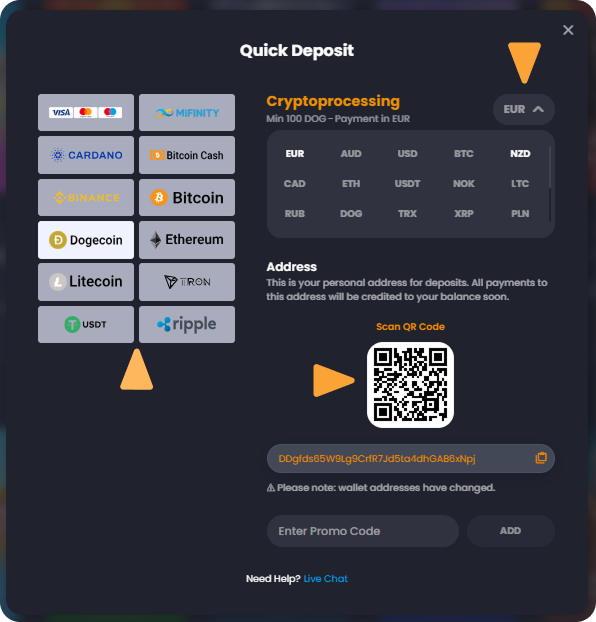
📥 Step 3: Copy your unique deposit address or scan the QR code
A personal deposit address will be generated just for you. You can either:
- Copy the address and paste it into your crypto wallet
- Or scan the QR code using your wallet app for quicker transfer
🚀 Step 4: Send the desired amount of DOG
From your external Dogecoin wallet, send the amount you want to deposit to the address provided.
⏳ Step 5: Wait for the confirmation
After the transaction is confirmed on the blockchain, the funds will appear in your Bitkingz balance. This usually happens within a few minutes.
💱 Why Do I Need to Choose a Fiat Currency When Depositing with Crypto on Bitkingz?
When making a cryptocurrency deposit on Bitkingz Casino, you’ll notice an option to select a fiat currency such as €, $, CAD, AUD, and others. While you’re depositing crypto — like Bitcoin, Ethereum, or Cardano — this step plays an important role in how your balance is processed and displayed.
By choosing your preferred fiat currency:
- ✅ Your crypto will be instantly converted into the selected currency at the current exchange rate.
- ✅ Your casino balance will be shown in that fiat currency, making it easier to track and manage.
- ✅ You can align your balance with your region or preferred currency, whether it’s €, $, or something else.
For example, if you deposit using Dogecoin and select €, your crypto amount will be converted and your balance will appear in euros — giving you clarity and full control over your funds.
This option ensures a seamless experience, especially when claiming bonuses, managing limits, or simply keeping track of your spending in a currency you understand best.
👉 Still not sure which cryptocurrencies are supported?
Check our Payments page for the full list of accepted coins.